
Set-up and Inflation
Remove Repose inner from the Air Pump and re-assemble.
Connect the Air Pump to the valve on the device – push to fit and begin inflation. Continue until you hear a click; this signals that correct inflation pressure has been achieved.
Disconnect and cover the valve with the solid end of the Repose sealing cap.
Remove the Enora cover from its packaging and insert the inflated Repose. The valve and the cover zip should be on the same side.
When installing, place Enora with the valve facing down and away from the user. Where present, use the fixing straps to secure it in place.
|
Product |
Comment |
|
Enora Air Sleeper |
Use securing straps on top and bottom of the overlay underneath the mattress it is being placed on |
|
Enora Air Seat |
i. Loop both upper fixing straps over the chair or wheelchair handles. ii. Loop the lower fixing strap around the back of the chair or wheelchair under the arm rests, clipping together and adjusting until secure. |
|
Enora Air Contur |
i. Insert the fixing straps between the seat and the arm rest, looping around the back of the chair, cross them and clip in place at the top. ii. Loop the bottom straps around either side of the foot rest. |
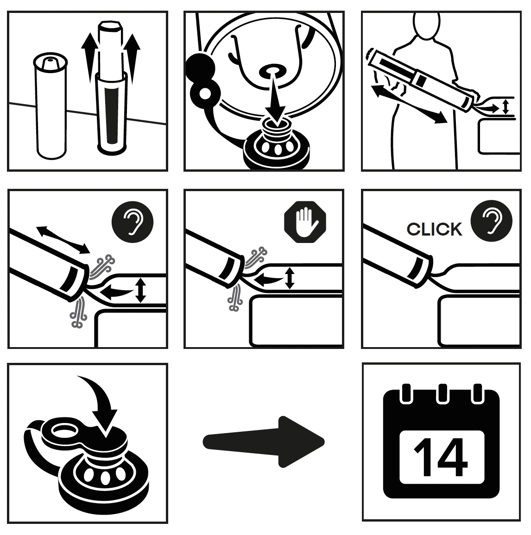
To ensure Enora is inflated optimally, check regularly and ‘top-up’ with the Air Pump every 14 days, with the user off the device.